LLM budget limits and API keys per team with Routerly
Two teams share one OpenAI account. One of them runs a support bot, the other runs research experiments. You want each team to have its own API key, a hard cap on what that key can spend, and a way to see who used what. This guide builds that on a Routerly instance, one command at a time.
Every command and output below was run on Routerly 0.6.0 against the real OpenAI API. Tokens are shortened to sk-rt-6a5***. The known limits at the end list what 0.6.0 does not do, so you do not discover it in production.
The model: a team is a router
In 0.6.0 the unit of isolation is the router. A router has its own models, its own tokens (the API keys your clients use) and its own usage. So the setup is:
- one router per team:
supportandresearch - one or more tokens per router: what the team’s applications send as
Authorization: Bearer ... - limits on the token, on the model, or on the router, that stop requests once a budget is used up
The budgets and limits page describes the three levels. A request must pass all of them.
1. Add the model and its prices
Budgets in dollars need prices. Add the model and set them:
routerly model add --id gpt-5-nano --provider openai --api-key "$OPENAI_KEY"
routerly model edit gpt-5-nano --input-price 0.05 --output-price 0.40
✓ Model "gpt-5-nano" registered.
✓ Model "gpt-5-nano" updated.Prices are per million tokens. For a global ceiling on the model, use --limits-json:
routerly model edit gpt-5-nano \
  --limits-json '[{"metric":"cost","windowType":"period","period":"monthly","value":50}]'
✓ Model "gpt-5-nano" updated.That caps the model at 50 USD per calendar month across every router.
2. Create a role for team leads
The built-in roles are admin, operator and viewer. A team lead needs to manage tokens and read usage, but not to edit models or users. Create a custom role:
routerly role add --id team-lead --name "Team lead" \
  --permissions router:read,model:read,report:read,token:read,token:write
✓ Role "Team lead" (team-lead) created.Permission names use the singular form (router:read, token:write). A user cannot grant permissions they do not hold: when the admin tried --permissions usage:read, which does not exist, the service answered Cannot grant or manage permissions you do not hold: usage:read, and the attempt appears in the audit log as privilege-escalation with result forbidden.
Then create one user per team lead:
routerly user add --email [email protected] --password "Alice-Passw0rd!" --role team-lead
routerly user add --email [email protected] --password "Bob-Passw0rd!!" --role team-lead
✓ User "[email protected]" created with role "team-lead".
✓ User "[email protected]" created with role "team-lead".3. One router per team
routerly router create --name support
routerly router create --name research
routerly router model add support gpt-5-nano
routerly router model add research gpt-5-nano
✓ Router "support" created.
ID: 44bfbbed-38a4-4e9c-8743-f097b3b2dbc7
Router token (save this, shown only once):
sk-rt-6a5***Each new router comes with a first token, shown once. Add the team lead as a member:
routerly router member add support --email [email protected] --role editor
routerly router member add research --email [email protected] --role editor
4. Issue a token with a hard limit
Create a token for the support bot and label it so you can find it later:
routerly router token create support --labels support-app --tag team=supportNow attach a limit to that token. The spec is <model>:<metric>:period:<period>:<value>. Metrics are cost, calls, input_tokens, output_tokens and total_tokens. Periods are hourly, daily, weekly, monthly and yearly. A rolling window is also available: <model>:<metric>:rolling:<amount>:<unit>:<value>.
For a visible demo, cap the token at three calls per day:
routerly router token edit support a86435fd-4160-40c7-a3f2-87ab5b804cb3 \
  --add-limit "gpt-5-nano:calls:period:daily:3"
For a real budget, use cost: gpt-5-nano:cost:period:monthly:20 limits that token to 20 USD per month.
List the tokens to confirm. The Per-model limits column shows how many limits each token carries:
routerly router token list support│ ID │ Snippet │ Labels │ Tags │ Per-model limits │
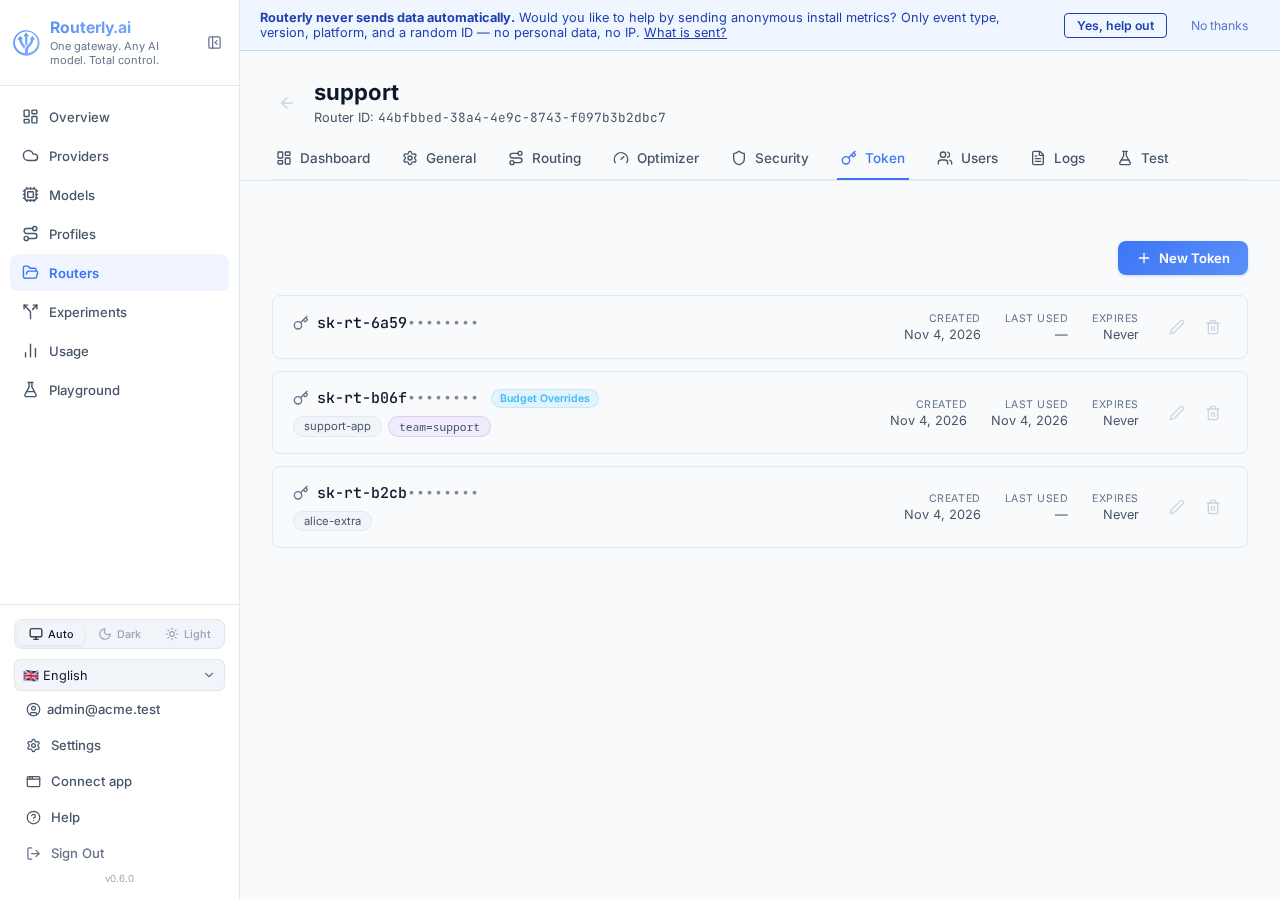
│ a86435fd-4160-40c7-a3f2-87ab5b804cb3 │ sk-rt-b06***… │ support-app │ team=support │ gpt-5-nano(1) │In the dashboard the same information is on the router’s Token tab. A token with limits carries a Budget Overrides badge, and labels and tags show next to it.
5. What happens when the limit trips
Send three chat requests with the limited token. All three succeed with HTTP 200. The fourth is refused:
curl -s -w '\nHTTP %{http_code}\n' http://127.0.0.1:3967/v1/chat/completions \
  -H "Authorization: Bearer $SUPPORT_TOKEN" -H "Content-Type: application/json" \
  -d '{"model":"gpt-5-nano","messages":[{"role":"user","content":"Reply with the single word: ok"}]}'
{"error":{"message":"Usage limit exceeded for every model of this router.","type":"insufficient_quota"}}
HTTP 429The status is 429, not 503, and the body has the OpenAI error shape, so official OpenAI SDKs handle it as a quota error. The Anthropic-compatible lane answers in the Anthropic shape:
curl -s -w '\nHTTP %{http_code}\n' http://127.0.0.1:3967/v1/messages \
  -H "x-api-key: $SUPPORT_TOKEN" -H "anthropic-version: 2023-06-01" \
  -H "Content-Type: application/json" \
  -d '{"model":"gpt-5-nano","max_tokens":50,"messages":[{"role":"user","content":"ok"}]}'
{"type":"error","error":{"type":"rate_limit_error","message":"Usage limit exceeded for every model of this router."}}
HTTP 429The window resets by itself at the end of the day. Nothing needs to be cleared by hand. The research router and its tokens kept working throughout, because the limit belongs to the support token.
6. See where the spend went
From the CLI, report usage groups by model and report calls lists single requests:
routerly report usage --period 30d┌────────────┬───────┬────────┬──────────────┬───────────────┬────────────┐
│ Model │ Calls │ Errors │ Input Tokens │ Output Tokens │ Cost (USD) │
├────────────┼───────┼────────┼──────────────┼───────────────┼────────────┤
│ gpt-5-nano │ 5 │ 0 │ 65 │ 370 │ $0.000151 │
└────────────┴───────┴────────┴──────────────┴───────────────┴────────────┘Filter by team with --router:
routerly report usage --period monthly --router research│ gpt-5-nano │ 2 │ 0 │ 26 │ 148 │ $0.000061 │routerly report calls --limit 10 shows router, token, model, tokens, cost, latency and outcome for each request. In the dashboard, the Usage page has the same data with filters for router, model, token, status, session, end user and tag.
7. Audit who changed what
Every management action is recorded:
routerly audit list --limit 12│ 11/4/2026, 12:11:34 PM │ [email protected] │ model:update │ success │
│ 11/4/2026, 12:10:03 PM │ [email protected] │ token:create │ success │
│ 11/4/2026, 12:09:50 PM │ [email protected] │ router:create │ success │
│ 11/4/2026, 12:09:33 PM │ [email protected] │ privilege-escalation │ forbidden │The role works as set. Logged in as alice, the commands that need a permission she lacks are refused:
$ routerly model edit gpt-5-nano --input-price 9
Error: Required permission: model:write
$ routerly user list
Error: Required permission: user:read
$ routerly audit list --limit 3
Error: Required permission: audit:read
She can create tokens on a router, which is what the role grants:
$ routerly router token create support --labels alice-extra
✓ Token created for router "support".
Troubleshooting
Requests return 429 “Usage limit exceeded for every model of this router”. A limit on the token, the model or the router is used up. Run routerly router token list <router> to see which tokens carry limits, and routerly model show <model> for the model. Raise or remove the limit with routerly router token edit ... --add-limit or --remove-limit "<model>:<metric>:<windowType>", or wait for the window to reset.
The docs mention HTTP 503 budget_exceeded. Some pages still describe that. On 0.6.0 the proxy answers 429 as shown above. Treat 429 as the contract.
routerly model edit --monthly-budget is an unknown option. Use --limits-json as in step 1.
role add refuses a permission. Check the exact names with routerly role list. They are singular (router:read, not routers:read), and you can only grant permissions you hold yourself.
A passthrough router has no limits. Budgets and limits do not apply to routers of kind passthrough, because the cost of that traffic is unknown.
Known limits
These are the limits of 0.6.0 that matter for this setup:
- No organization or team spend groups. The documentation mentions them, but the endpoint does not exist in 0.6.0 (
POST /api/spend-groupsreturns 404). A team is a router with its tokens, and the cap is per token, per model or per router. - Router-level limits have no editor. They are read from the router configuration file. The CLI and the dashboard do not expose them, so this guide uses token limits and model limits.
- Blocked requests are not in usage. The refused fourth request returned 429 but does not appear in
report usageorreport calls. - Router assignment is not a permission boundary. Assigning a user to a router (
--routers,router member add) did not stop that user from listing the other router, creating a token on it or reading its report in this test. Scope access with roles, and treat team separation as an organizational convention until this is fixed. - Passthrough routers bypass budgets, as noted above.
For the full reference, see users and roles, usage, the CLI commands and the management API.